Use the shared checklist
Guide · Planning together
See who's bringing what, so you don't end up with three coolers and no tent.
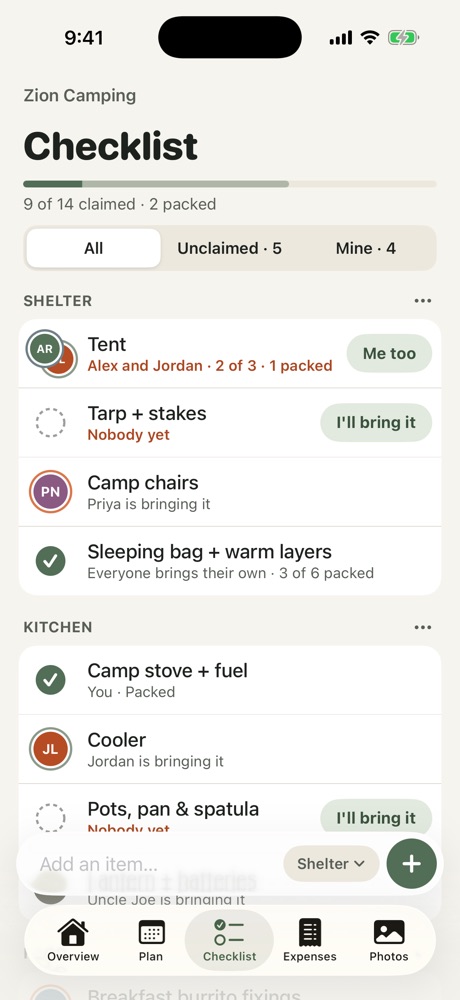
- Open the Checklist tab.
- Tap New section to group things, like Kitchen or Shelter.
- Type an item in the bar at the bottom, pick its section and tap +.
- Tap I'll bring it to claim an item. Tap the circle when it's packed.
Filter by Unclaimed to see what still needs someone, or Mine to see your own list.
Who brings it
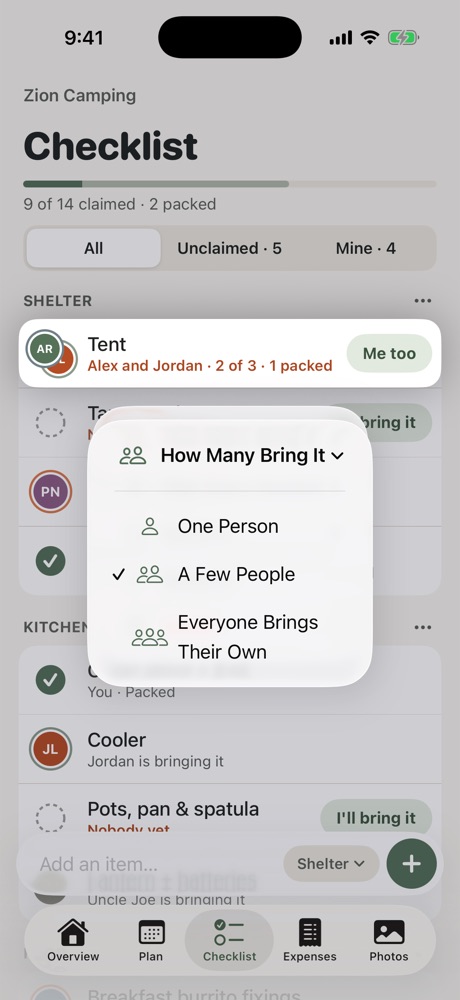
Long-press an item and choose How Many Bring It:
- One Person: the default. One person claims it.
- A Few People: for things like tents. Set how many are needed and several people can sign up.
- Everyone Brings Their Own: for things like an ID or a sleeping bag. Each person ticks off their own.
More
- Add a checkout list: things to do before you leave the stay, like taking out the trash.
- Suggest items: Freya suggests what to pack for this trip. See Ask Freya.
More in Planning together
- Plan the itinerary
- Bring in a plan from a doc or AI chat
- Run a poll
- Stay, flights and the meetup
- Notes, search and calendar
- Ask Freya
Still stuck? Email contact@freyatripplanner.com or search the guide.